Desktop · USB mixer
Record the set. Keep the tracklist.
Boothkeep records a DJ set from any USB mixer, levels out gain creep and quiet vinyl to −14 LUFS, and writes a timed tracklist—even when records are pitched or blended. Cue in headphones, match edits from your own folder, and upload straight to Mixcloud or YouTube. £19 once. The recording never leaves your computer.
Version 0.2.6 for Mac, Windows, and Linux. The Mac build is Apple silicon and Intel. Windows may show a SmartScreen prompt on the first launch.
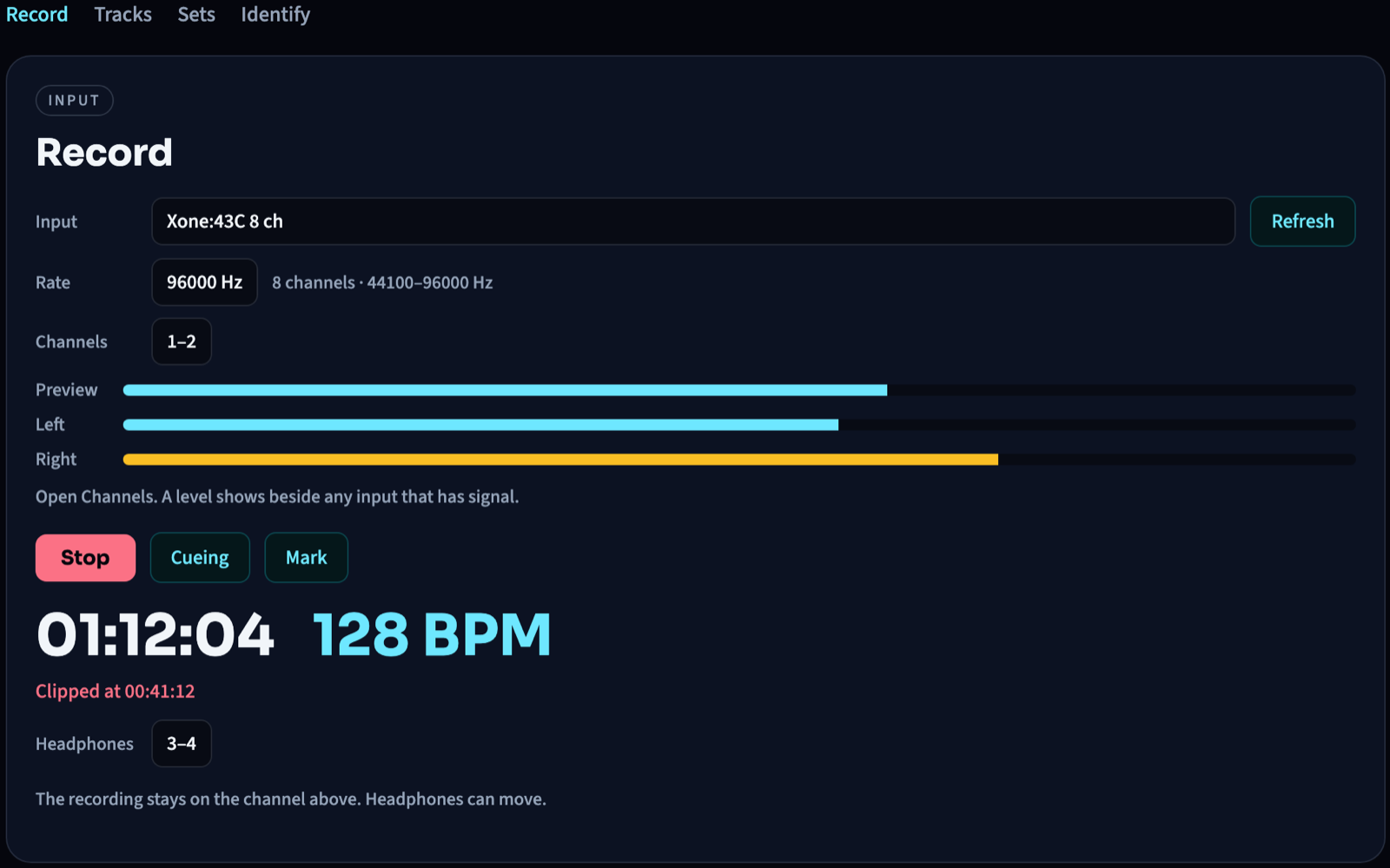
Record the mixer
Record any USB audio input in 24-bit WAV, AIFF, or FLAC. Each stereo pair shows a live signal meter in the menu so you never record an empty bus, and a preview meter runs before you press Record. When you stop, Boothkeep levels out gain creep and quiet records to −14 LUFS without squashing kicks, and writes a 320 kbps MP3 ready to upload.
Hear it while you record
Cue the mixer through your computer while the recording stays locked on the stereo pair you chose—with room microphones blocked so speakers never feed back. A booth clock, live BPM, and sticky clip timestamp stay up for the take, and now-playing.txt feeds OBS while you play.
Check the Mixcloud rules before you upload
Mixcloud limits how many tracks from one artist or one release a show can play. Boothkeep checks your tracklist against its Featured Artist Rules (4 per artist, 3 in a row, 3 per release, 2 in a row), marks the tracks that break a limit, and suggests a fix. Switch to subscribers only to see when a show would play just for subscribers. Edit the list and the check runs again.
Leave with a tracklist
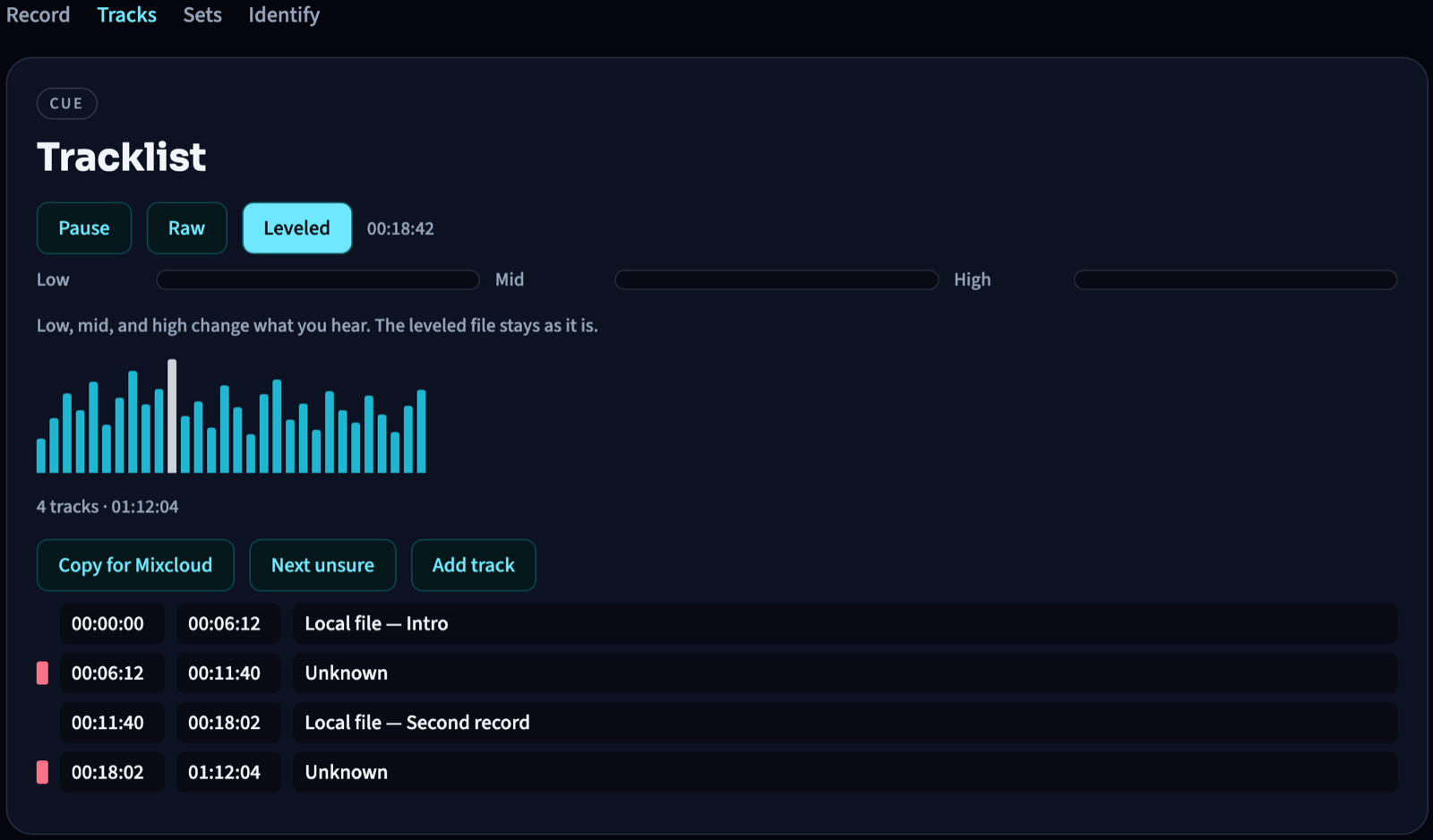
Match edits, dubs, and white labels against your own folder—even pitched up or down and blended across EQ filters—or import a Serato session or Rekordbox XML. Released vinyl can be named from a single 12-second clip per track. Check transitions on the waveform, copy YouTube chapters, save a tracklist image, or upload the mix and times straight to Mixcloud.
Features
Everything in the app
The trial records for 3 minutes. A license adds the full length, loudness leveling, the 320 kbps MP3, matching your own files, and naming released records.
Record
- Any USB audio input the computer already lists
- Stereo pair and sample rate
- Preview meter before Record
- A level beside any channel that has signal
- Peak, RMS, and left and right meters
- 24-bit WAV, AIFF, or FLAC
- Booth clock and a live BPM
- The clip time stays on screen
- Cue through headphones
- Headphones can move to another pair while the take stays on the channel you chose
- Mark a record during the take
- Level to −14 LUFS, true peak −1 dBTP, when recording stops
- now-playing.txt in the set folder, for OBS
Tracks
- Play the raw take or the leveled file
- Waveform: click to hear a point, drag a boundary
- Low, mid, and high change what you hear. The file stays as it is
- Hear a track from its start, or the blend around that start
- Edit the start, the end, the artist, the title, and the release
- Add a track, insert one, or remove one
- Unsure rows are marked. Next unsure plays each one
- Copy a Mixcloud post, with the set name and date
- Copy YouTube chapters, starting at 0:00
- Save a tracklist image
- Upload the mix to Mixcloud, with the track times
- Check the tracklist against Mixcloud’s Featured Artist Rules, for all listeners or subscribers only
- Import a Serato session or a Rekordbox XML file
Sets
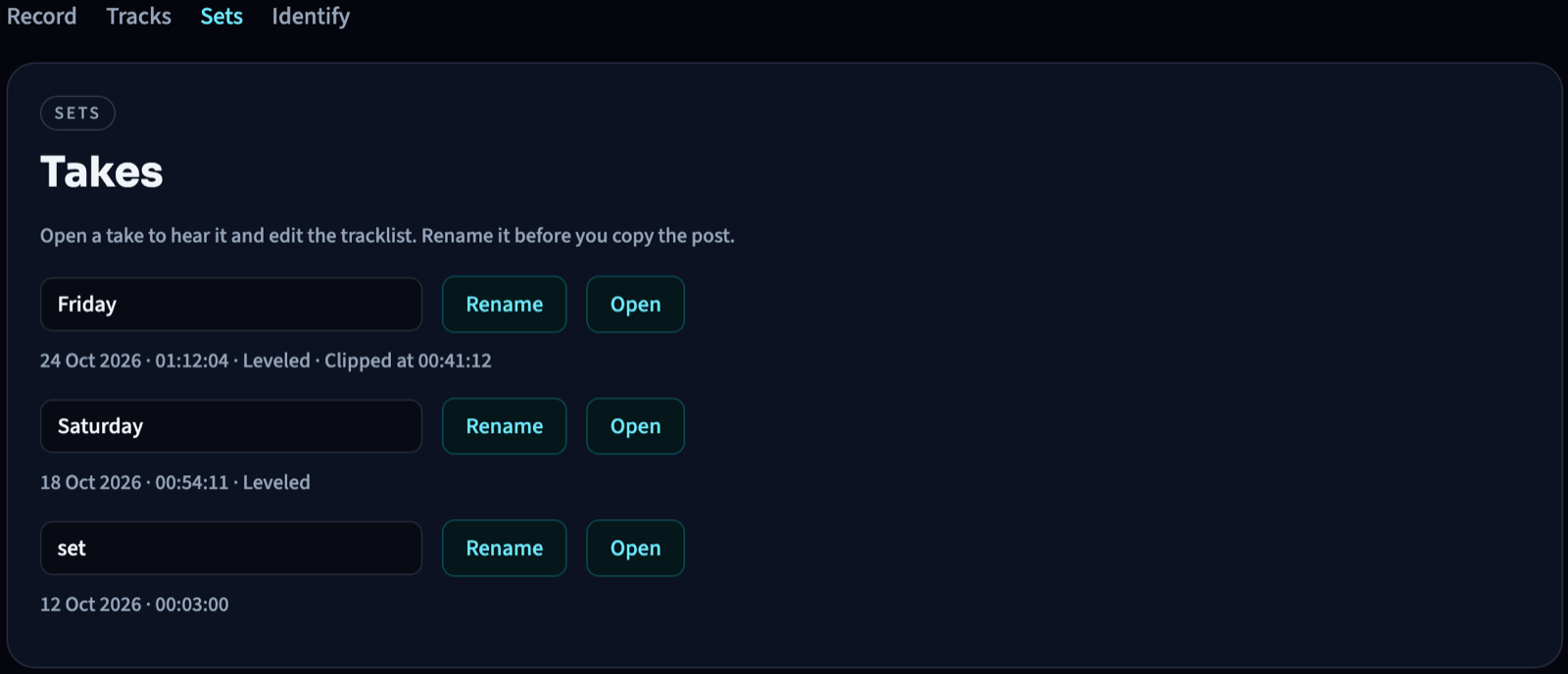
- Every take in the folder, with the date and the length
- Leveled and clipped show on the row
- Rename a take
- Open it and the tracklist comes with it, including the list saved beside the leveled file
Identify
- Match edits, bootlegs, and white labels against a folder on this computer
- Name released records from one 12-second clip. That stays off until you turn it on
- Type any row by hand
Saved with the take
- A timed text file, a cue sheet, and JSON
- The leveled recording
- A 320 kbps MP3
- A tracklist image
On this computer
- The recording stays here. An update check sends no name and no license key
- One computer. Restore the key from the checkout email, or release this computer for another
- On a Mac, Update available installs the new build and reopens Boothkeep
- On Windows and Linux, Update available downloads the installer
Guides
Record, level, and name a set
USB routing, −14 LUFS, timed tracklists, and headphone cue. Written for the booth.
USB mixer · Xone
How to Record an Allen & Heath Xone:43C (or Xone:96) Over USB
Xone:43C USB pairs 1–4 are pre-fader DVS inputs, so Audacity only hears Deck 1. Loop REC OUT, or use USB 11–12 on a Xone:96, and pick the pair with signal in Boothkeep.
Loudness · −14 LUFS
Why Your Recorded DJ Mix Sounds Too Quiet (and How to Level It to −14 LUFS)
REC OUT and internal recorders leave 6–12 dB of headroom, so peak normalize in Audacity stays quiet. Boothkeep rides the take to −14 LUFS with a two-pass BS.1770 limiter.
Tracklist · Identify
How to Generate a Timed Tracklist from a Recorded DJ Set (Even with Pitched Edits & Vinyl)
Cloud recognizers miss pitched club mixes and unreleased dubs. Boothkeep matches your folder ±14%, imports Serato or Rekordbox, and IDs vinyl from a 12-second clip.
Serato · Rekordbox · Upload
How to Turn a Serato Session or Rekordbox XML into YouTube Chapters and a Mixcloud Upload
Import a Serato session or Rekordbox XML into Boothkeep, audit blends on the waveform, then copy YouTube chapters or upload a 320 kbps MP3 to Mixcloud.
Cue · OBS
How to Cue a USB Mixer in Headphones on Mac, Windows, or Linux (Plus OBS Now-Playing)
Cue a USB mixer in headphones on Mac, Windows, or Linux without a room mic feeding back, and feed now-playing.txt into OBS while you record.
Questions
Recording a USB mixer
Which mixers does Boothkeep record?
Any mixer that shows up as a USB audio input. Pick the stereo pair that is carrying the set. On an Allen & Heath Xone:43C the USB sockets hear the four rear deck inputs, before the faders, so the master is not on USB. Loop the REC OUT into an unused line input and record that pair.
Do I need a driver?
A class-compliant mixer needs no extra driver. It appears with the other audio inputs. If the mixer’s maker supplies a driver, install that first, then pick the mixer in Boothkeep.
Can Serato or Rekordbox stay open?
One program can hold the mixer. Quit the other app, or record a pair it is not using. Boothkeep does not replace the DJ software. It records the USB audio and writes the tracklist.
How do the tracks get their names?
Four ways. Point Boothkeep at a folder of your edits, bootlegs, and white labels and it matches them on this computer—even when pitched ±14% or blended with EQ. If you played in Serato or Rekordbox, import the session or XML directly. For vinyl or unindexed records, Boothkeep finds each transition and can name tracks from a single 12-second clip (off until you turn it on). Any row can be typed by hand.
What does £19 cover?
One computer. Full-length recordings, loudness leveling to −14 LUFS, a 320 kbps MP3, matching your own files, naming released records, the Mixcloud rules check, and later updates. The trial records for 3 minutes, with cue, marks, playback, and a tracklist you can edit and copy. The recording stays on that computer.
Is the same app on Mac, Windows, and Linux?
Yes. Version 0.2.6 is the current build on all three. The Mac installer is signed and notarized. Windows may show a SmartScreen prompt the first time you open it.
Changelog
What shipped
0.2.6
Mac, Windows, Linux
Each track now has a Release field. Releases are filled in from Rekordbox imports, named vinyl, and your own files, and you can type one on any row. Adding marks keeps the artist, title, and release you already had. The Mixcloud check now counts “Artist feat. X” as the same artist and catches a compilation played across several artists.
0.2.5
Mac, Windows, Linux
Mixcloud rules checker. Press Check Mixcloud Rules in Tracks to see whether a set keeps to Mixcloud’s Featured Artist Rules: up to 4 tracks from one artist and 3 in a row, up to 3 from one release and 2 in a row. Choose all listeners or subscribers only. The tracks involved are marked, each with a suggested fix. From the command line: boothkeep mixcloud-check.
0.2.3
Mac, Windows, Linux
Bug fixes.
0.2.2
Mac, Windows, Linux
Bug fixes.
0.2.1
Mac, Windows, Linux
Bug fixes.
0.2.0
Mac, Windows, Linux
Performance and bug fixes.
0.1.10
Mac, Windows, Linux
Hear, Blend, Insert, and Remove sit on their own line, so a track added with Insert can be removed.
0.1.9
Mac, Windows, Linux
Tracks shows YouTube, Mixcloud, the tracklist image, and history import as soon as you open a take. The list saved beside the leveled file is loaded with it.
0.1.8
Mac, Windows, Linux
Upload the leveled mix to Mixcloud, copy YouTube chapters, and import a Serato session or a Rekordbox XML file. A 320 kbps MP3 is written beside the leveled file. The loudness line names the −14 LUFS target. A tracklist image and an OBS now-playing file come with the take.
0.1.7
Mac, Windows, Linux
Cue stays on the mixer. A room microphone is refused, so sound from the speakers does not come back as an echo. Windows and Linux catch up to this build.
0.1.6
Mac
Booth clock, clip light, and live BPM. A shelf of sets. Unsure rows in the tracklist. Headphones can move while the take keeps recording.
0.1.5
Mac
Update available downloads the new build, asks for the password once, and reopens Boothkeep.
0.1.4
Mac
Record, Tracks, and Identify are separate. Cue a channel, mark a record, and play the take.
0.1.3
Mac
The signed app asks for the microphone. That is how it hears the mixer.
0.1.2
Mac
The channel menu shows a level beside an input that has signal, plus a preview meter before Record.
0.1.0
Mac, Windows, Linux
Record a USB input, even the loudness, and write a timed tracklist.
License
Pay once. Record the whole set.
The trial records for 3 minutes. A license is for one computer, and updates are included.
Trial
£0/ 3 minutes
- Record and stop at 3 minutes
- Cue, the clock, marks, and playback
- Edit the tracklist and copy it
License
£19/ this computer
- Full-length recordings
- Loudness leveling, −14 LUFS
- A 320 kbps MP3 of the leveled mix
- Match your own files
- Name released records
- Updates included
The key is shown after payment. Paste it into Boothkeep. The signature is checked on this computer. Restore a key with the email from checkout. The link goes to that inbox.